Tuesday, September 5, 2023

Monitor solar heating with ebusd

I have Wolf flat-plate collector on my roof to heat water in the bottom of the warm water tank. There is simple monitoring (Wolf BM Solar) which shows whether heating is on and temperatures on the collector and in the tank. I wanted to see this data in my Home Assistant.

Wolf does not support OpenTherm but eBUS. After short searching on internet, I've found eBUS adapter which can monitor/control eBUS devices (mainly boilers). Delivery took about 2 months but finally I have it now.

First steps with the adapter are well described. Yet I had some issues:

  • flashing and accessing web interface (easi) was fine
  • I've struggled with easi authentication - after entering credentials, accessing it from the same browser still worked. Only accessing it from another browser timed out and I don't see a way how to enter credentials (passing them in the url does not work). I will dig deeper into it later. UPDATE: it's fixed by 2023-09-03 firmware.
  • I run ebusd on my Turris router in docker. For some reason, which I don't remember now, all my docker containers had forbidden access to internet. HomeAssistant is fine with it but ebusd needs to download configuration files and it took me a while to find out why requests for configuration were failing.

The biggest issue was with configuration. My Wolf is not supported out of the box. Following docker readme, I have run the following command:

root@turris:~# docker run --rm -it -p 8888 john30/ebusd --scanconfig -d ens:192.168.1.87:9999 --latency=20
2023-09-03 18:07:50.453 [main notice] ebusd 23.2.23.2 started with auto scan on device: 192.168.1.87:9999, enhanced
2023-09-03 18:07:51.734 [bus notice] device status: resetting
2023-09-03 18:07:51.735 [bus notice] bus started with own address 31/36
2023-09-03 18:07:51.740 [bus notice] signal acquired
2023-09-03 18:07:52.240 [bus notice] device status: reset, supports info
2023-09-03 18:07:52.355 [bus notice] device status: extra info: firmware 1.1[380f].1[380f], jumpers 0x0f
2023-09-03 18:07:58.939 [bus notice] new master 71, master count 2
2023-09-03 18:07:58.939 [update notice] received unknown BC cmd: 71fe50180e0080008000800080008000800000
2023-09-03 18:08:02.009 [bus notice] scan 76: ;Kromschroeder;  ;0227;-
2023-09-03 18:08:02.009 [update notice] store 76 ident: done
2023-09-03 18:08:02.009 [update notice] sent scan-read scan.76  QQ=31: Kromschroeder;  ;0227;-
2023-09-03 18:08:02.009 [bus notice] scan 76: ;Kromschroeder;  ;0227;-
2023-09-03 18:08:02.219 [main error] HTTP failure: receive error: 404 Not Found
2023-09-03 18:08:02.219 [main error] unable to load scan config 76: list files in kromschroeder ERR: element not found
2023-09-03 18:08:02.219 [main error] scan config 76: ERR: element not found
2023-09-03 18:08:13.921 [update notice] received unknown BC cmd: 71fe50171000011a016b0200800080008000800080
2023-09-03 18:08:28.879 [update notice] received unknown BC cmd: 71fe50180e0080008000800080008000800000

I connected to docker shell and get more info:

root@600974f7960e:/# ebusctl i
version: ebusd 23.2.23.2
device: 192.168.1.87:9999, enhanced, firmware 1.1[380f].1[380f]
signal: acquired
symbol rate: 20
max symbol rate: 47
min arbitration micros: 4
max arbitration micros: 4
min symbol latency: 17
max symbol latency: 19
scan: finished
reconnects: 0
masters: 2
messages: 12
conditional: 0
poll: 0
update: 4
address 31: master #8, ebusd
address 36: slave #8, ebusd
address 71: master #9
address 76: slave #9, scanned "MF=Kromschroeder;ID=  ;SW=0227;HW=-"

Using HowTos and Message definition, I was able to decode above unknown messages:

2023-09-03 18:08:13.921 [update notice] received unknown BC cmd: 71fe50171000011a016b0200800080008000800080
2023-09-03 18:08:28.879 [update notice] received unknown BC cmd: 71fe50180e0080008000800080008000800000

root@7e8bde847891:/# ebusctl grab result
71fe50171000010301580200800080008000800080 = 2
71fe50180e0080008000800080008000800000 = 3

There is a master device (id 71) - that's the solar heating. Then there is a slave device (id 76) which is Wolf BM Solar module (it displays data from master). The master broadcasts (BC in log or fe in message) messages. PBSB of messages are 5017 and 5018.

I've searched through ebusd-configuration repo for PBSB codes and found them in ebusd-2.x.x/de/wolf/50.csv.

To be able to use updated configs, I've created ebusd_config folder on turris that is shared to ebusd docker container. Based on unable to load scan config 76: list files in kromschroeder error, I've created kromschroeder subfolder there where I

  • copied ebusd-2.x.x/de/_templates.csv to ebusd_config/kromschroeder/_templates.csv
  • copied ebusd-2.x.x/de/wolf/50.csv to ebusd_config/kromschroeder/76.csv
  • copied ebusd-2.x.x/de/wolf/broadcast.csv to ebusd_config/kromschroeder/broadcast.csv and added 2 lines with missing PBSB codes (changing message type to broadcast b):
    # type (r;w;u;1-9),class,name,comment,QQ,ZZ,PBSB,ID,field1,part (m;s),type / templates,divider / values,unit,comment,field2,part (m;s),type / templates,divider / values,unit,comment,field3,part (m;s),type / templates,divider / values,unit,comment,field4,part (m;s),type / templates,divider / values,unit,comment,field5,part (m;s),type / templates,divider / values,unit,comment,field6,part (m;s),type / templates,divider / values,unit,comment,field7,part (m;s),type / templates,divider / values,unit,comment
    *b,broadcast,,,,FE,,,,,,,,,,,,,,,,,,,,,,,,,,,,,,,,,,,,,,,,,,,,
    b,,betrd,Betriebsdaten des Feuerungsautomaten an den Regler,,,0503,01,status,,UCH,,,Feuerungsautomatstatus,zustand,,HEX,,,Feuerungsautomatzustand,stellgrad,,percent0,,,StellgradKesselleistung (Wolf Gastherme Ersatzwert: FF),kesseltemp,,temp1,,,Kesseltemperatur ,ruecklauftemp,,temp0,,,Rücklauftemperatur ,boilertemp,,temp0,,,Boilertemperatur ,aussentemp,,outsidetemp,,,
    b,,sollw,Sollwertübertragung des Reglers an andere Regler,,,0800,,kesselsolltemp,,temp2,,,Kesselsollwert,aussentemp,,temp2,,,Außentemperatur,leistungszwang,,D1B,,%,Leistungszwang,status,,HEX,,,Status,brauchwassersolltemp,,temp2,,,Brauchwassersollwert,,,,,,,,,,,,
    b,,ertraege,,,,5018,,leistung,,D2B,,,Solarleistung,ertraglow,,UCH,,,ErtragTagLow,ertraghigh,,UCH,,,ErtragTagHigh,ertragsummelow,,UCH,,,SummeErtragLow,summertraghigh,,UCH,,,SummeErtragHigh,ertragsumme,,UCH,,,SummeErtragM,,,,,,
    b,,temp,,,,5017,,pumpe,,UCH,0xbc=off;0xbd=on,,SolarPumpe,,,IGN:1,,,,kollektortemp,,temp,,,Kollektortemperatur,wwsolartemp,,temp,,,WW Solartemperatur,,,,,,,,,,,,,,,,,,
    

I ran the docker again and success:

root@turris:~# docker run --rm -it -p 8888 -v "/srv/ebusd_config:/mnt:ro" john30/ebusd --scanconfig --configpath=/mnt -d ens:192.168.1.87:9999 --latency=20
2023-09-03 21:03:05.609 [main notice] ebusd 23.2.23.2 started with auto scan on device: 192.168.1.87:9999, enhanced
2023-09-03 21:03:05.853 [bus notice] device status: resetting
2023-09-03 21:03:05.854 [bus notice] bus started with own address 31/36
2023-09-03 21:03:05.873 [bus notice] signal acquired
2023-09-03 21:03:06.305 [bus notice] device status: reset, supports info
2023-09-03 21:03:06.473 [bus notice] device status: extra info: firmware 1.1[380f].1[380f], jumpers 0x0f
2023-09-03 21:03:15.326 [bus notice] new master 71, master count 2
2023-09-03 21:03:15.326 [update notice] received unknown BC cmd: 71fe5017100001e000430200800080008000800080
2023-09-03 21:03:16.113 [bus notice] scan 76: ;Kromschroeder;  ;0227;-
2023-09-03 21:03:16.113 [update notice] store 76 ident: done
2023-09-03 21:03:16.113 [update notice] sent scan-read scan.76  QQ=31: Kromschroeder;  ;0227;-
2023-09-03 21:03:16.113 [bus notice] scan 76: ;Kromschroeder;  ;0227;-
2023-09-03 21:03:16.115 [main notice] read common config file kromschroeder/broadcast.csv
2023-09-03 21:03:16.116 [main notice] read scan config file kromschroeder/76.csv for ID "", SW0227, HW65535
2023-09-03 21:03:16.116 [main notice] found messages: 8 (0 conditional on 0 conditions, 0 poll, 4 update)
2023-09-03 21:03:30.288 [update notice] received update-read broadcast ertraege QQ=71: -;0;128;0;128;0
2023-09-03 21:03:45.274 [update notice] received update-read broadcast temp QQ=71: 0;14.00;36.19

Data from master broadcast (temp QQ=71: 0;14.00;36.19) tells me that:

  • 0 - pump is not running
  • 14.00 - collector temperature
  • 36.19 - warm water tank temperature

I'm not interested in ertraege (yield of the solar) - gathering is turned off anyway.

The final command to run ebusd in the background has to use environment variables to set the parameters:

docker run --name ebusd -d -p 9090:9090 -v "/srv/ebusd_config:/mnt:ro" -e EBUSD_DEVICE=ens:192.168.1.87:9999 -e EBUSD_SCANCONFIG= -e EBUSD_CONFIGPATH=/mnt -e EBUSD_LATENCY=20 -e EBUSD_HTTPPORT=9090 john30/ebusd

There are several options how to get data from ebusd to Home Assistant. As I don't use MQTT and I need just 2 values, I've decided to use simple polling via http (that's why EBUSD_HTTPPORT parameter in above command). I've tried to secure it by -e EBUSD_READONLY= but that resulted in failures of reading the configuration (which is actually expected as I have found later).

rest:
  - resource: http://192.168.1.1:9090/data/broadcast/temp
    scan_interval: 15
    binary_sensor:
      - name: Solar - running
        unique_id: solar_ohrev_id
        device_class: running
        value_template: "{{ value_json['broadcast']['messages']['temp']['fields']['pumpe']['value']|int == 1 }}"
    sensor:
      - name: Solar - collector temperature
        unique_id: solar_kolektor_id
        state_class: measurement
        device_class: temperature
        value_template: "{{ value_json['broadcast']['messages']['temp']['fields']['kollektortemp']['value'] }}"
        unit_of_measurement: °C
      - name: Solar - tank temperature
        unique_id: solar_teplota_vody_id
        state_class: measurement
        device_class: temperature
        value_template: "{{ value_json['broadcast']['messages']['temp']['fields']['wwsolartemp']['value'] }}"
        unit_of_measurement: °C

This is graph from today's sunny weather. It's nicely visible how the full tank was heated to over 60°C.

  • red line - collector's temperature
  • blue line - bottom tank temperature
  • orange line - top tank temperature

Sunday, January 8, 2023

Quest for lower electricity consumption - What does burn the heat?

Equipped with long term data, I started performing tests. As described previously, my home setup is not that simple.

Heating pipe for warm water tank is not separated from central heating pipes by three-way valve. When heating up the tank, the pump for tank circle runs and the other two are off. Vice versa when heating the central heating branches.

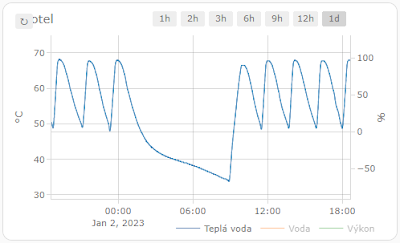
This is the usual temperature graph for a night (that means no warm water concumption):

From 65°C to 50°C in approximately 2,5 hours. The reason for not fully heated tank around 1:00 is there more expensive electric tariff between 1:00 - 2:00 and the boiler is turned off.

Hypothesis
My first idea was the water in tank is cooled by water from the central heating. So I closed valves for a night and checked the graph.


The cooling rate from 65°C to 45°C is the same as for any other night, so cooler water for the central heating is not the culprit. Why the tank cannot keep hot water longer was a mystery...

Culprit
Finding the real culprit required having a beer with neighbors in a pub. More head, the greater knowledge and soon we had a hypothesis that the loss of heat is caused by natural circulation. My warm water tank is in the basement and warm water pipes go through the house and returns to the tank. As pipes are relatively wide, they allow natural circulation. When I stopped the circulation, the graph looked much better. The loss was less than 15°C in 8 hours.


Now I just have to figure out what to do. With no circulation, it takes quite a long time to get warm water from the tap. With circulation, the cost of heating is high... 

My current idea is to use electric valve and open the circulation just for a while, probably speeding it up with a pipe.


Edit:
The real culprit was found when new tank was installed - the reverse flap was faulty and caused natural circulation. Once fixed, the warm water can circulate only in one direction again and there is no natural circulation anymore.

Tuesday, January 3, 2023

Quest for lower electricity consumption - Investigate Arduino Crash

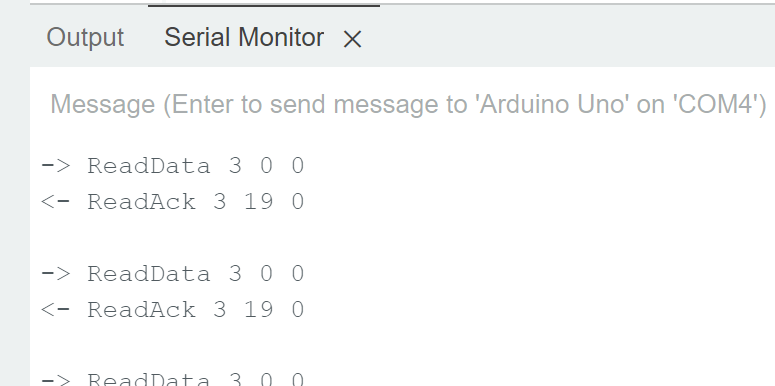
As I wrote last time, my joy did not last long because the data flew only for 1-2 hours and then it stopped. I connected WeMos to my laptop and boiler and kept it running while logging the progress to serial monitor. Eventually, it crashed (full log):


11:21:19.141 -> --------------- CUT HERE FOR EXCEPTION DECODER ---------------
11:21:19.141 ->
11:21:19.141 -> Exception (0):
11:21:19.141 -> epc1=0x402010f4 epc2=0x00000000 epc3=0x00000000 excvaddr=0x00000000 depc=0x00000000
11:21:19.141 ->
11:21:19.141 -> >>>stack>>>
11:21:19.141 ->
11:21:19.141 -> ctx: sys
11:21:19.141 -> sp: 3fffebb0 end: 3fffffb0 offset: 0190
11:21:19.141 -> 3fffed40: 3ffefa44 3ffee748 3ffee740 401001e2
11:21:19.141 -> 3fffed50: 3ffe0000 3ffeec30 3ffee740 4010041b
...
11:21:20.500 -> 3fffff90: 3fffdad0 00000000 3ffee824 401004dd
11:21:20.500 -> 3fffffa0: 3fffdad0 00000000 3ffee824 40206906
11:21:20.500 -> <<
11:21:20.500 -> --------------- CUT HERE FOR EXCEPTION DECODER ---------------
11:21:20.500 ->
11:21:20.500 -> ets Jan 8 2013,rst cause:2, boot mode:(3,6)
11:21:20.500 ->
11:21:20.500 -> load 0x4010f000, len 3460, room 16
11:21:20.500 -> tail 4
11:21:20.500 -> chksum 0xcc
11:21:20.500 -> load 0x3fff20b8, len 40, room 4
11:21:20.500 -> tail 4
11:21:20.500 -> chksum 0xc9
11:21:20.547 -> csum 0xc9
11:21:20.547 -> v000604e0
11:21:20.547 -> ~ld

The problem was that although WeMos did somehow restart, it did not pass the step that connects it again to wifi and stuck there. I had to find why it crashed.

ESP documentation shows you how to deal with crashes. I've installed Arduino ESP8266/ESP32 Exception Stack Trace Decoder and ... nothing. I just could not find it in the menu. After searching through forums, I've found out it's because I use the new Arduino IDE v2 written in Node and the decoder is a Java plugin for Arduino IDE v1. There are some ways how to make it work with v2 IDE but for me the easiest way was to install IDE v1 (1.8.19). Finally, I had the stack trace:


Exception 0: Illegal instruction
PC: 0x402010f4
EXCVADDR: 0x00000000

Decoding stack results
0x401001e2: OPENTHERM::_writeBit(unsigned char, unsigned char) at C:\Users\lucen\Downloads\Arduino\thermona.el9/opentherm.cpp line 204
0x4010041b: OPENTHERM::_timerISR() at C:\Users\lucen\Downloads\Arduino\thermona.el9/opentherm.cpp line 169
0x401004f4: timer1_isr_handler(void*, void*) at C:\Users\lucen\AppData\Local\Arduino15\packages\esp8266\hardware\esp8266\3.0.2\cores\esp8266\core_esp8266_timer.cpp line 37
0x4010053c: timer1_isr_handler(void*, void*) at C:\Users\lucen\AppData\Local\Arduino15\packages\esp8266\hardware\esp8266\3.0.2\cores\esp8266\core_esp8266_timer.cpp line 44
0x40101340: _stopPWM(uint8_t) at C:\Users\lucen\AppData\Local\Arduino15\packages\esp8266\hardware\esp8266\3.0.2\cores\esp8266\core_esp8266_waveform_pwm.cpp line 264
0x40100750: __digitalWrite(uint8_t, uint8_t) at C:\Users\lucen\AppData\Local\Arduino15\packages\esp8266\hardware\esp8266\3.0.2\cores\esp8266\core_esp8266_wiring_digital.cpp line 87
0x401001e2: OPENTHERM::_writeBit(unsigned char, unsigned char) at C:\Users\lucen\Downloads\Arduino\thermona.el9/opentherm.cpp line 204
0x401004bc: ets_post(uint8, ETSSignal, ETSParam) at C:\Users\lucen\AppData\Local\Arduino15\packages\esp8266\hardware\esp8266\3.0.2\cores\esp8266\core_esp8266_main.cpp line 181
0x401004f4: timer1_isr_handler(void*, void*) at C:\Users\lucen\AppData\Local\Arduino15\packages\esp8266\hardware\esp8266\3.0.2\cores\esp8266\core_esp8266_timer.cpp line 37

But I was not clever from it... What illegal instruction during sending data to boiler? It's worth to note my knowledge about C++ is almost zero and the same applies for Arduino/WeMos HW. So I was not really sure what I need to look for...

I've enabled all compiler warnings in IDE Preferences and saw a warning about ICACHE_RAM_ATTR deprecation in favor of IRAM_ATTR. I have updated it in OpenTherm library but program still crashed. So I continued to search through forums. 

Soon, I've found this StackOverflow question about ISR (Interrupt Service Routine) and why IRAM_ATTR attribute is needed. It did not ring the bell for me. Retrospectively, it should especially if I read it more carefully but I didn't and thus still not understand the issue. I just knew it has something to do with interrupts, functions not available in memory. Few hours forward and I found great blog post by Chris Dzombak: Debugging an Intermittent Arduino/ESP8266 ISR Crash. I had the same reset reason (rst cause:2, boot mode:(3,6)) and Chris explained his investigation so well that even I have finally understand it.

I've went through all functions that were called from OPENTHERM::_timerISR() method and add IRAM_ATTR attribute. I uploaded it to WeMos and ran it. It did successfully pass 2 hours timestamp. But it crashed again after about a day. Looking at the new crash I saw almost the same stack trace. I gave up and added IRAM_ATTR attribute to all private methods and public send method (code). Since then, the data has been flowing flawlessly for couple of days now, so it seems the problem has been fixed!

Monday, January 2, 2023

Quest for lower electricity consumption - WeMos D1 Mini R2

WeMos D1 Mini is an ESP8266 WiFi board compatible with Arduino. OpenTherm shield and library should support it so switch from Arduino Uno should be easy... Of course, it was not :-)

First let's wire it correctly. I've seen complain on github it does not work with some pins. Here is my wiring which works for me:
  • OpenTherm jumper set to 3.3V
  • OpenTherm D3 - WeMos D1 (via header) : #define BOILER_IN 5
  • OpenTherm D5 - WeMos D5 (via header) : #define BOILER_OUT 14
  • OpenTherm 3.3V - WeMos 3.3V
  • OpenTherm GND - WeMos GND

Picture which shows both leds blinking (ON and RxB leds) - proof it works:


If you, for example, connect 5V from WeMos to 5V on OpenTherm shield, it will not work (it took me almost an hour to figure it out).

My code is based on examples how to connect to wifi, use https client and send a POST request (you can easily open them from Arduino IDE  via menu File - Examples - ESP8266HTTPClient).

Data for every message type is sent to a webhook in Home Assistant (message id is suffix in webhook name). Sensor configurations are straightforward except conversion of bit mask to binary sensor:

template:
  - trigger:
      - platform: webhook
        webhook_id: boiler0
    sensor:
      - name: Boiler - updated at
        unique_id: boilerupdate
        state: "{{ as_timestamp(now())|timestamp_custom('%d. %m. %Y %H:%M:%S') }}"
        icon: mdi:clock-time-four-outline
    binary_sensor:
      - name: Boiler - error
        unique_id: boiler0fault
        state: "{{ trigger.json.data|int|bitwise_and(1) > 0 }}"
        device_class: problem
      - name: Boiler - central heating
        unique_id: boiler0ch
        state: "{{ trigger.json.data|int|bitwise_and(2) > 0 }}"
        device_class: running
      - name: Boiler - warm water
        unique_id: boiler0dhw
        state: "{{ trigger.json.data|int|bitwise_and(4) > 0 }}"
        device_class: running
      - name: Boiler - heating
        unique_id: boiler0flame
        state: "{{ trigger.json.data|int|bitwise_and(8) > 0 }}"
        device_class: running
  - trigger:
      - platform: webhook
        webhook_id: boiler18
    sensor:
      - name: Boiler - pressure
        unique_id: boiler18
        state: "{{ trigger.json.data }}"
        state_class: measurement
        device_class: pressure
        unit_of_measurement: bar
        icon: mdi:speedometer
...
Using all sensors, I've created a dashboard in Home Assistant to have a full picture how the boiler works :


But my joy did not last long - within 1-2 hours, the data stopped flowing :-( Next post will be about figuring why?

PS: The above image is from future when the issue is fixed.

Friday, December 30, 2022

Quest for lower electricity consumption - OpenTherm

The first article ends by the need to get more data from boiler because it heats warm water too often.

The first step I did was actually disabling circulating warm water every 15 minutes which I used to have always warm water immediately instead of waiting until it reaches a tap. Surprisingly, I observe almost no difference. There is still quite warm water immediately in the tap but the boiler heats water with the same frequency...

My home heating setup consists of two main heating branches - one with central heating (additionally split to radiators and floor heating) and the second with external tank for warm water. For some reason there is no three-way valve to stop flowing water to external tank when running in central heating mode. I suspect this is the culprit why boiler heats external tank approximately every two hours. To confirm it, I need data about what mode the boiler runs (although it can be guessed from the power consumption) and temperature in the external tank which triggers its heating. All can be retrieved via OpenTherm protocol.

OpenTherm standard is designed for communication between boiler and thermostat. Mine boiler - Thermona Therm EL 9 - does support it.

Googling how to get data from OpenTherm resulted in several links:

  1. https://www.home-assistant.io/integrations/opentherm_gw/
    Hurray - there is a way how to get data to Home Assistant!
  2. http://otgw.tclcode.com/ - the gateway. Unfortunately, it looks quite complex...
  3. https://github.com/jpraus/arduino-opentherm - library for Arduino by Jiří Praus with his HW looks much easier to use and I went for this option.
  4. Only later I have found out it would be enough to use https://ihormelnyk.com/opentherm_adapter (because I don't need to communicate with thermostat).
I have ordered OpenTherm Gateway Arduino Shield. I struggled to find 24V power supply, even wrote to Jiří who quickly suggested GME but eventually I've ordered it from Tipa. Soldering it together was a challenge as I have soldered only big electronic parts till now. Because of my "huge" experiences, I've managed to solder headers upside down so I need to use wires to connect it to Arduino Uno for testing.

Eventually, I was able to put everything together and test the hardware, interfaces and self-test. All tests have passed. The only issue/difference I saw was in step 6 where I measured ~4.7V instead of 5-7V.

Here is the wiring because it was not obvious for me; pin constants in code are the same:
  • OpenTherm jumper set to 5V
  • OpenTherm D3 - Uno D3 (via header) : #define BOILER_IN 3
  • OpenTherm D5 - Uno D5 (via header) : #define BOILER_OUT 5
  • OpenTherm 5V - Uno 5V
  • OpenTherm GND - Uno GND

Having wired the OpenThem shield with Arduino, next step was to get data from boiler using sample code. The code uses arduino-opentherm library which needs to be put into Arduino IDE Sketchbook library folder (e.g. C:\Users\{username}\Documents\Arduino\libraries\arduino-opentherm on Windows).


It worked! Going through OpenThem 2.2 specification, I've identified useful messages for my boiler:
  • OT_MSGID_STATUS - boiler's status (what does it heat)
  • OT_MSGID_FAULT_FLAGS - current fault code
  • OT_MSGID_MODULATION_LEVEL - boiler's power (0-100%)
  • OT_MSGID_CH_WATER_PRESSURE - boiler's water pressure
  • OT_MSGID_FEED_TEMP - boiler's water temperature
  • OT_MSGID_DHW_TEMP - warm tank's water temperature
  • OT_MSGID_OUTSIDE_TEMP - outside temperature (for equithermal regulation)
  • OT_MSGID_DHW_SETPOINT - target water tank temperature
Next step is to switch from Arduino Uno to WeMos D1 so I can send the data wirelessly to my Home Assistant.

Thursday, December 29, 2022

Quest for lower electricity consumption - Measurement

With electricity prices skyrocketing this year, I've started looking into ways how to save some money by lowering electricity consumption. The first step is of course measurement!

I use Shelly Plus 2PM to control my external blinds so the choice was obvious - use Shelly 3EM. To get some idea how installation looks like, I watched Shelly 3EM Installation video by Jimmy James. Based on that, I've decided I can handle it myself.

Shelly 3EM Installation
The problem was space in our electrical cabinet. Because it's not only 1 spot for the meter but another 3 for the circuit breaker and place around input wires to put clamps. Eventually, I've hacked it for the beginning and put the circuit breaker outside of the cabinet. Just to see whether the meter works fine.


It does! Of course, later I plan to make it nicer and hide the cables into the wall.

Setup Shelly 3EM In Home Assistant
Setup in Shelly web interface is easy - I just restricted access for admin, configured wifi and added Device name - I called in Main Power so it will look good in Home Assistant. Then I added the Shelly integration to my Home assistant which configured automatically all sensors. I remember small hick-up with discovering the device - you need to enter just IP address and then it will ask you for user/password (I was trying to add http://IP which does not work).


Later I have updated Shelly settings based on recommendation for generation 1 devices and set ColoT peer directly to my Home assistant IP address. It seems to me it speeds up updates in Home Assistant.


Energy Dashboard
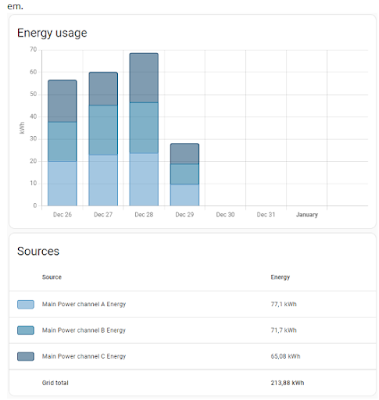
For Energy dashboard in Home assistant, I just added all three channels/phases as Grid consumption - it nicely shows the consumption split by them.


Detailed Energy Graphs
To see detailed consumption, first I set up Total Power sensor in configuration.yaml (based on Jimmy video):

template:
    - name: Total Power
      unique_id: total_power_tmpl
      unit_of_measurement: W
      state_class: measurement
      device_class: energy
      state: >
        {% set phase1 = states('sensor.main_power_channel_a_power') | float %}
        {% set phase2 = states('sensor.main_power_channel_b_power') | float %}
        {% set phase3 = states('sensor.main_power_channel_c_power') | float %}
        {{ phase1 + phase2 + phase3 }}
And then using apexcharts-card graphs, I've set up cards showing consumption in the last hour, 6 hours, etc.

type: custom:apexcharts-card
graph_span: 1h
header:
  show: true
  title: Energy 1h
all_series_config:
  stroke_width: 1
series:
  - entity: sensor.total_power
    name: Total
    color: rgb(162, 185, 207)
  - entity: sensor.main_power_channel_a_power
    name: Phase A
    color: rgb(3, 169, 244)
  - entity: sensor.main_power_channel_b_power
    name: Phase B
    color: rgb(128, 233, 234)
  - entity: sensor.main_power_channel_c_power
    name: Phase C
    color: rgb(255, 191, 128)

The big spikes on 6h graph are when our boiler heats tank with warm water. The problem is it does it every ~2 hours even during night which is too often and thus costly…

The next part is to find out more data from the boiler.

Thursday, July 16, 2020

Unit Testing is Overrated

I have found  very good article about testing:

Unit Testing is Overrated

Here are the main takeaways:

  1. Think critically and challenge best practices
  2. Don't rely on the the test pyramid
  3. Separate tests by functionality, rather than by classes, modules, or scope
  4. Aim for the highest level of integration while maintaining reasonable speed and cost
  5. Avoid sacrificing software design for testability
  6. Consider mocking only as a last resort

I have two notes:
  1. Relying on acual GeoIP provider - I'd fake it for PR gates because we don't want to block our PRs when the provider has an outage. I keep using it for CD gates.
  2. Caching test is not sufficient - I'd add assert the cache contains tested record.

The article links another good posts:
  • Write tests. Not too many. Mostly integration. - The Testing Trophy
    It doesn't matter if your component renders component b with props c and d if component b actually breaks if prop e is not supplied. So while having some unit tests to verify these pieces work in isolation isn't a bad thing, it doesn't do you any good if you don't also verify that they work together properly. And you'll find that by testing that they work together properly, you often don't need to bother testing them in isolation.
  • Testing of Microservices - integration test is the king

Monday, August 24, 2015

Lessons, Surprises, Mistakes - v2015

Schedule
Rewriting the application always takes much longer time then you think. The POS was ready for the new season but the admin part was missing and was only implemented during the first month. On the other hand, the new architecture splits the deliverable code to the kiosk and admin packages so admin updates do not affect kiosks and the kiosk part is smaller.

Database structure
I have the proper SQL initialization script (instead of creating the tables by AMS). The database is normalized so getting data for reports is easier. Previously, the transactions were stored in one table where items was just a string of item ids. The reason was to have simple server code - I did not want to write server JavaScript code which inserts data into two tables. Now, the Entity Framework handles all the complexity so the transaction items are stored in separate table.

Query speed differences
I thought there wouldn't be big difference when running SQL queries on my local SQL 2014 comparing to Azure - and if so, that Azure would be faster. But I was wrong. For some reason, the same query via Entity Framework took couple of seconds on local database but couple of minutes in Azure. I had no idea how to debug it and find the reason so I rewrote the query into pure SQL which works fine.

Slow Android browser
When I was testing the application on tablet, I saw it is very slow. After you touch a button, you had to wait a little bit to be your next touch recognized. Annoying. So I tried all available browsers for Android and the best one is Opera. It hast the largest screen estate and it is really fast - see the picture.


Ghost transactions
When my neighbor checked the sales one morning, he was very surprised. There were sales for 450 000,- Kč in one kiosk. Quite a lot when a small ice cream costs 14,- Kč! It turned out that the touch layer on the tablet went crazy and generated touch events on the lower part of the display. The kiosk signed in a cashier at 3:15 by itself and created one transaction every two seconds on average. Interesting bug - on the other hand, it was nice load test :-).

Shift duplicate check
Kiosks send all errors to the server and I check them from time to time. Early after launch, there was an error that shift cannot be saved because it already exists in database. It turned out I forgot duplicate error handling for new shifts. If the shift was correctly stored in the database but the server response got lost, kiosk tried to send the shift again and again.

Thursday, August 20, 2015

POS v2015

The new version of POS should resolve several issues I had with the first version:
  • Smaller application size - 402 kB is quite a lot when my code is just 78kB
  • Admin part should work on iPhone - as I wrote previously, this looks like Durandal issue
  • Resolve token expiration
  • Resolve the mysterious double transactions

Plus I wanted to try new stuff:
  • Azure Mobile Services with .NET backend
  • Gulp, Browserify
  • Mocha, Chai and Sinon for JS testing

The above basically means to rewrite the app from scratch.

Smaller application size, iPhone
To decrease application size, I decided to remove Durandal and jQuery and go with just Knockout. Communication among view models/modules is done via knockout-postbox - a simple pub/sub library. Other libraries I use are Underscore.js and Moment.js. The final size is 220kB - almost a half of the first version. The biggest part is of course AMS client library with 134kB.

Removing Durandal also removed sign-in issue on iPhone so my neighbor can finally use his phone to check daily sales.

Resolve token expiration
In the end, I've implemented the easier solution. Application remembers when the login token was acquired and it signs out kiosk user after 25 days as soon as there is no opened shift. Because credentials are stored in the browser, it's just one more click for the cashier.

Resolve the mysterious double transactions
Of course it was my fault! When I performed deep analysis of duplicated transactions, I've found out they are single-item transactions within sequence of single-item transactions. And then it struck  me - I don't check whether save is in progress when saving new transaction. As the transactions from local storage are sent in FIFO order, the same transaction was sent several times to the server when cashier created multiple transactions in row. Some of the duplications were caught by the server check for the transaction duplication but some slipped through as saving data on server is asynchronous.

The new version of course have the save in progress check and I have not seen any duplicate transactions.

Azure Mobile Services with .NET backend
Using .NET backend in AMS server part is much easier for me then using JS backend. One can use local server for development with local database so new functionality development and testing is simpler. Also adding custom endpoints is easy as it is almost normal Web Api application. I was hacking CRUD endpoints in JS backend in past.

The backend uses Entity Framework to communicate with SQL server. I don't like EF much. It's a black box to me - I don't know how it creates SQL queries and what should I do to optimize them. So I rather use pure SQL queries for all custom endpoints functionality (get data for reports).

Gulp, Browserify, Mocha, Chai, Sinon
I find Gulp easier to work with than working with Grunt. It's probably because I prefer to write what I want to do then to define a configuration. Configuration is fine for simple cases but for anything else, the list of commands to do is better.


I use Browserify to manage module dependencies and create the final package. I found example how to use Browserify with Mocha so I switched to Mocha from Jasmine. It really does not matter which test library one use as long as you test your code.

Tuesday, August 12, 2014

Open issues

This is the last article for the moment. It is about things I don't know how to solve or have not yet had time to solve.

Double transactions
I've already mentioned this issue but I still don't know what is the root cause and how to mitigate it. The check to not insert already inserted transaction prevents creation of ~25 double transactions per day. Still, I see there is usually one double transaction per day (that is per ~2500 transactions). I am quite confident this is a sever side issue as __createdAt times are very close to each other.

POS does not work on iPhone
For some reason, the application does not work on iPhone. The main page is displayed, user is correctly redirected to the Google's sign in page but after successful sing in, she is redirected back to the main page which does not proceed to the next page. I've briefly tested the issue on borrowed iPhone and found out it is caused by combination of AWS and Durandal. Pure AWS page works just fine and I have not found any indicia that Durandal does not work on iPhone. I believe I just need to borrow the iPhone for longer time to fix this issue.

Built-in *.azurewebsites.net SSL certificate
The server is hosted on azurewebsites.net domain and uses built-in wildcard certificate for secure access. Although I have read several articles that using wildcard certificates is bad, I don't think it is bad in our case. It is a REST service where both endpoints are fixed. If you disagree, please let me know an example of real threat.

For reference:

Authentication token expiration
The authentication token expires approximately every month. Which is the reason why I still have not developed automatic re-authentication when the token expires. It hasn't had enough priority.

There is a way how to do it generally for all requests by using withFilter (usage example). Or I will just sign out and in every couple of days. Whatever will be easier to implement.

No tests for server side JavaScript
I have tests for client side JavaScript and for SQL queries but I do not have any tests for sever side JavaScript. The main reason is there was usually just a few lines of simple code so I did not bother to create a testing set up. But this is slowly changing so creating server side JavaScript tests climbs up to the top of my to-do list.

Saturday, August 9, 2014

Lessons, Surprises, Mistakes III. - AMS

Next set of lessons, surprises and mistakes; this time about Azure Mobile Services (AMS).

Download location
Maybe I am blind but I cannot find a download link for the actual version of MobileServices.Web.js script. WinJs versions are easily available via nuget. Digging into tutorials I have found a location with all Web versions. Comparing it with nuget page, the latest available Web version is 1.2.2 (although WinJs is already at 1.2.3):
http://ajax.aspnetcdn.com/ajax/mobileservices/MobileServices.Web-1.2.2.min.js

Update 24.1.2015: There is a changelog from which you can see that at this moment, the latest Javascript SDK is 1.2.5.

Shared Scripts
There is a possibility to manually upload a script to shared folder on server:
azure mobile script upload shared/helper.js
You can then use it via require in other scripts:
var helper = require('../shared/helper');

Unfortunately, the scripts there are periodically deleted. It turned out that manual upload is not supported and you can only use this feature if you enable source control. See more info on forum.

Stuck scheduled tasks
I've managed to get the scheduled AMS task into state where it ignored all my updates. It ran the old script version no matter what I did. Even deleting the task and creating a new one with different name did not help. I asked on forum and got quickly an advice how to work around the issue by restarting the whole mobile services.

Wrong authorization
Although I require an authorized user when accessing all AMS endpoints, it took me a while to spot an error in my implementation. I did not refuse cashier operations from unknown users. You couldn't do it from UI, of course. But any script kiddie could download the POS, get the application id, authorize with any google account, and send as many transactions/shifts as wanted. The fix was simple - only allow server operations to known users.

SQL Tables Initialization
I let AMS to create my tables. It was a mistake. Only when I started to have performance issues with getting report data, I realized what types are used for the data. For example, as JavaScript does not have integers but only floats, all integer values were stored in float columns. Not very fast and index-able… I have changed type of some columns but next time I will create proper SQL init script.

SQL query optimizations
I had not written complex SQL query for a long time so the first version of the report query was quite embarrassing. There were too many inner queries and other issues. After a consultation with my friend, I speeded up the query by
  • Use null id trick to select the whole row with max value
  • Use union all instead of union because all sub-queries are distinct
  • Converting float columns to integer columns
  • Index on date column did not help because server still clustered index on __createdAt column which has very similar content to the date columns

Monday, August 4, 2014

Lessons, Surprises, Mistakes II.

Next set of lessons, surprises and mistakes; this time various issues in no particular order.

Hardware issues
We use some cheap Android Sencor Element tablets. From 10 tablets, 2 were faulty and we had to replace them. You can recognize faulty tablet by its freezing. Yet there were also more interesting manifestations (appeared only on one tablet):
  • Time speeding up by minutes per hour. That produced transactions and shifts with wrong time. Automatic time synchronization does not help as I assume it is synchronized only once per day.
  • Touch events were not registered in some areas of the screen or were shifted (touching on one place triggers action from different place).

User feedback
It's always good to observe and talk to your very end users. Based on seeing the POS in action and talking to one cashier, I realized the buttons were too small. The cashier had hard time to aim at the right button. So I've made all buttons and texts as big as possible:


Wrong development browser size
I use Chrome Resolution Test plugin to easily resize browser window to tablet's resolution (1024 x 786). But I made a stupid mistake. The POS web page on tablet spreads across the full tablet screen (minus Android menu bar) while the plugin resizes the whole browser window to the specified size. So page areas were different. To have the same area in browser and on tablet (1024 x 720), the correct resolution for the plugin is 1034 x 826.

Browser zooming
Cashiers had also problem with browser zooming triggered by double tap. For a long time, I did not know how to disable it because I thought it is as a browser functionality and looked for an option in browser. Eventually, I've found out it is a HTML5 meta viewport property and you can turn it off by:
<meta name="viewport" content="user-scalable=0" />

JavaScript caching
I was surprised that browser loads JavaScript files from cache even when you ask to bypass it (e.g. by Ctrl+F5). I have not found a way how to force reloading JavaScript files. As a fix, I append a timestamp to main.js in the release package (and index.css because it can be cached too).

Automatic updates
Uptake of a new version was slow. It was normal that an old version was used several days after the new version was released because page refresh was needed on POS and only company employees could do it. Luckily, there was no critical update needed.

I've implemented automatic updates like this: successful ping request returns the actual server version. When it comes back to a tablet, it means there is internet connection (necessary because of mobile internet - see the previous post). When the server version does not match with the client version and there is no cashier signed in, the web page is refreshed which performs the update. The server version is set manually as part of release deployment.

Friday, August 1, 2014

Lessons, Surprises, Mistakes I. - Internet Connection

This is the first of several posts about my mistakes, surprises and lessons learned. I'm always eager to see other's experiences so I can learn from them. Here are mines so you can learn from me.

Going Live
1st April morning. It kind of works. Most kiosks are online and I see signed in cashiers and some transactions. Some kiosks are offline. I guessed internet connection problems.

It was very similar during the next couple of days. There were rare moments when all kiosks were online. Most of the time at least one kiosk was offline. We discussed the cause of the issues and it was clear that the culprit was the internet connection. The mobile internet is ***. It disconnects every now and then, it drops packets, it is sloooooow. Especially in the kiosk which is a big metal box. I had to mitigate the problems.

Status emails
First step was to have better visibility of the problems. Having status page with kiosks overview was nice but it was not enough - nobody periodically checked it. That's why I've implemented status emails. AMS offers scheduled jobs and I use them to periodically check kiosk statuses and send warning email with problematic kiosks. Initially, the check was every 30 minutes but there were too many emails and nobody cared about them. Currently, the status is checked once per hour during the opening hours and a warning is sent only when kiosk does not ping for more than one hour.

Automatic router restarts
We've discovered the biggest issue in routers. They disconnect from the internet quite often. Luckily for us, routers have monitoring functionality. They can ping specified servers and if no reply comes back, they restart themselves. Once turned on (with 30 minutes threshold), the internet reliability increased dramatically.

Inability to sign in/out
Pages in Durandal are stored in separate files. That means there has to be internet connection to successfully navigate to another page (e.g. starting/ending shift). I thought (but not tested) that browser would cache all pages. But I was wrong and with such bad internet connection, some cashiers could not sign in or out - the screen just turned white because the target page could not be loaded.

The solution is to build the whole app into three files (index.html, index.css, and main.js) which are loaded at once during POS initialization. To do that, I use grunt-durandal and grunt-uncss tasks when creating release package. The only communication then is sending data to server which is backed up in local storage.

Double transactions
Another sign of bad internet connection is double transactions. POS sends data, data is written into database, but the confirmation is lost on a way back and POS sends data again. I have actually seen several triple transactions in the database. To solve this issue, I have added a check before inserting a new data into database.

It did not fully mitigated the issue though. I'm still seeing some duplicate transactions. AMS provides createdAt column and according to this column these duplicate transactions are usually milliseconds apart or even at the same time. I have no idea how these duplicate transactions are created. It can be strange network behavior, bug in AMS…

Success transaction visibility
This is a small tweak. POS displays whether the last server operation was successful or not. It's not for cashiers because they don't care. It's mainly for company employees when they check the kiosk on site to know that everything is OK.

Summary
After implementing above fixes, the reliability is quite good. It is rare to see offline kiosk. There is still some work I'd like to do though. For example, I do not properly handle authentication token expiration so somebody has to manually re-login kiosks every ~30 days otherwise they would be offline because of missing authentication.

Tuesday, July 29, 2014

POS Architecture

The initial design proved itself to be working nicely so I've stuck to it:
  • Android tablet in each kiosk connected to the Internet via 3G Wi-Fi router. Tablets with 3G modem are more expensive and every kiosk had already been equipped with 3G Wi-Fi router because of the previous system.
  • HTML SPA (Single Page Application) as client POS application running in the browser on the tablet
  • JavaScript Azure Mobile Services (AMS) with SQL database as server
The software architecture is guided by using Durandal (MVVM design pattern) on the client and AMS on the server. I decided to use Durandal because I like the testability of MVVM applications and AMS because of its easy use.

POS as web page
The whole POS software runs as a HTML5 application in full screen browser. Cashiers cannot use other apps on the tablet because the special tablet holder hides main Android menu, all hardware buttons and prevents edge swiping which is the only way how to control the browser. Here is the picture of the real device:

POS

Authentication
All AMS endpoints require authenticated user. AMS supports several authentication providers. I've chosen Google provider as all company employees have Google account. Special Google account has been created for every kiosk. The kiosk account is signed in in the POS browser all the time so no cashier needs to know its password.

Authorization
There are only two groups of users:
  1. Cashiers
    They can only insert data (transactions, shifts)
    . Every cashier has assinged a PIN which is used to start her shift.
  2. Company employees
    Additionally to cashiers, they can also edit some data (cashier management) and read the data (reports). As there are only 3 employees at this moment, their Google ids are hardcoded in scripts.

Offline mode
Because kiosks are connected to the Internet via mobile network, I expected they can be offline from time to time. That’s why every operation is first saved to browser local storage and only when server confirms it is saved in the database, it is deleted from the local storage. When confirmation comes, then next unsaved operation is sent to the server until the queue is empty. Operations are sent one by one to not trigger multiple requests at the same time (imagine sending all transactions from one day at once).

Operations
As the launch day approached, I started to wonder/worry how to monitor the health of the kiosks. There is no way to connect to them from the Internet and check the POS status. So I did it other way round. Every POS pings the server in specified interval (10 minutes) and reports its status (signed in cashier, locally stored operations, POS version). Company employees and I have access to the web page which displays statuses of all kiosks. The most important information is whether kiosk is alive (pinging) or dead. Repair is simple - restart tablet and/or router.

Release package
Grunt task for creating release package contains steps to uglify JavaScript and uncss/mincss (uglify for CSS rules). Initially, the Durandal pages were separate files even in the release package but I had to change it (more on that later). Now, the whole POS consists of three files: index.html, index.css, and main.js.

Sunday, July 27, 2014

Development Environment

I took this project as an opportunity to learn recent web development techniques. This is the list of buzz words I've used:

First, I used Bower to download Durandal and Bootstrap and prepared some basic Grunt configuration (run web server for development). Then, I dived into Durandal and learned how to structure the application. I tried to scaffold the app structure with existing Durandal's Grunt configuration but eventually, I created everything from scratch using the scaffolding structure as a tutorial. One learns more with this approach.

Having basic app structure (2 pages wired together) and grunt configuration, I created my first Jasmine test. I wanted to practice TDD for development but I found out that it does not work well for me. I did not have any clear vision how things would work and I did a lot of changes during the development. That's why I have just classic unit tests. Once I am satisfied with a feature, I create unit tests for it to make sure I won't break it in future.

Although Durandal uses AMD, I worried about referencing source files from tests. The research, experimentation and creating Grunt configuration took me some time. But it works nicely in the end. Grunt's Jasmine task references two require.config.js files. The first one is the main application require.config.js file and the second one is Jasmine's one with baseUrl pointing to application's folder. All unit tests run when any of my JavaScript files change.

The last thing to figure out was how to test SQL queries. I set it up only later when I was developing the report and it was obvious that with manual testing I would not be able to cover all the corner cases properly. I use T.S.T. and I set it up like unit tests. I have special query file which contains just the SQL query. Using simple script, this query is inserted into production and testing JavaScript template files. If any of these files change, tests are triggered. Of course, there is a Grunt task for firing it up.

Note at the end: web technologies change rapidly. Today, instead of Durandal, I might use just Knockout 3 based on Steve Sanderson NDC presentation:  Architecting large Single Page Applications with Knockout.js.