Thursday, December 29, 2022

Quest for lower electricity consumption - Measurement

With electricity prices skyrocketing this year, I've started looking into ways how to save some money by lowering electricity consumption. The first step is of course measurement!

I use Shelly Plus 2PM to control my external blinds so the choice was obvious - use Shelly 3EM. To get some idea how installation looks like, I watched Shelly 3EM Installation video by Jimmy James. Based on that, I've decided I can handle it myself.

Shelly 3EM Installation
The problem was space in our electrical cabinet. Because it's not only 1 spot for the meter but another 3 for the circuit breaker and place around input wires to put clamps. Eventually, I've hacked it for the beginning and put the circuit breaker outside of the cabinet. Just to see whether the meter works fine.


It does! Of course, later I plan to make it nicer and hide the cables into the wall.

Setup Shelly 3EM In Home Assistant
Setup in Shelly web interface is easy - I just restricted access for admin, configured wifi and added Device name - I called in Main Power so it will look good in Home Assistant. Then I added the Shelly integration to my Home assistant which configured automatically all sensors. I remember small hick-up with discovering the device - you need to enter just IP address and then it will ask you for user/password (I was trying to add http://IP which does not work).


Later I have updated Shelly settings based on recommendation for generation 1 devices and set ColoT peer directly to my Home assistant IP address. It seems to me it speeds up updates in Home Assistant.


Energy Dashboard
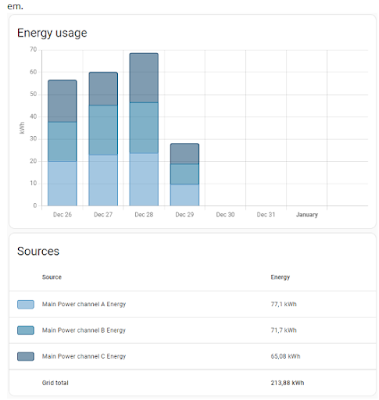
For Energy dashboard in Home assistant, I just added all three channels/phases as Grid consumption - it nicely shows the consumption split by them.

Detailed Energy Graphs
To see detailed consumption, first I set up Total Power sensor in configuration.yaml (based on Jimmy video):

template:
    - name: Total Power
      unique_id: total_power_tmpl
      unit_of_measurement: W
      state_class: measurement
      device_class: energy
      state: >
        {% set phase1 = states('sensor.main_power_channel_a_power') | float %}
        {% set phase2 = states('sensor.main_power_channel_b_power') | float %}
        {% set phase3 = states('sensor.main_power_channel_c_power') | float %}
        {{ phase1 + phase2 + phase3 }}
And then using apexcharts-card graphs, I've set up cards showing consumption in the last hour, 6 hours, etc.

type: custom:apexcharts-card
graph_span: 1h
header:
  show: true
  title: Energy 1h
all_series_config:
  stroke_width: 1
series:
  - entity: sensor.total_power
    name: Total
    color: rgb(162, 185, 207)
  - entity: sensor.main_power_channel_a_power
    name: Phase A
    color: rgb(3, 169, 244)
  - entity: sensor.main_power_channel_b_power
    name: Phase B
    color: rgb(128, 233, 234)
  - entity: sensor.main_power_channel_c_power
    name: Phase C
    color: rgb(255, 191, 128)

The big spikes on 6h graph are when our boiler heats tank with warm water. The problem is it does it every ~2 hours even during night which is too often and thus costly…

The next part is to find out more data from the boiler.

Thursday, July 16, 2020

Unit Testing is Overrated

I have found  very good article about testing:

Unit Testing is Overrated

Here are the main takeaways:

  1. Think critically and challenge best practices
  2. Don't rely on the the test pyramid
  3. Separate tests by functionality, rather than by classes, modules, or scope
  4. Aim for the highest level of integration while maintaining reasonable speed and cost
  5. Avoid sacrificing software design for testability
  6. Consider mocking only as a last resort

I have two notes:
  1. Relying on acual GeoIP provider - I'd fake it for PR gates because we don't want to block our PRs when the provider has an outage. I keep using it for CD gates.
  2. Caching test is not sufficient - I'd add assert the cache contains tested record.

The article links another good posts:
  • Write tests. Not too many. Mostly integration. - The Testing Trophy
    It doesn't matter if your component renders component b with props c and d if component b actually breaks if prop e is not supplied. So while having some unit tests to verify these pieces work in isolation isn't a bad thing, it doesn't do you any good if you don't also verify that they work together properly. And you'll find that by testing that they work together properly, you often don't need to bother testing them in isolation.
  • Testing of Microservices - integration test is the king

Monday, August 24, 2015

Lessons, Surprises, Mistakes - v2015

Schedule
Rewriting the application always takes much longer time then you think. The POS was ready for the new season but the admin part was missing and was only implemented during the first month. On the other hand, the new architecture splits the deliverable code to the kiosk and admin packages so admin updates do not affect kiosks and the kiosk part is smaller.

Database structure
I have the proper SQL initialization script (instead of creating the tables by AMS). The database is normalized so getting data for reports is easier. Previously, the transactions were stored in one table where items was just a string of item ids. The reason was to have simple server code - I did not want to write server JavaScript code which inserts data into two tables. Now, the Entity Framework handles all the complexity so the transaction items are stored in separate table.

Query speed differences
I thought there wouldn't be big difference when running SQL queries on my local SQL 2014 comparing to Azure - and if so, that Azure would be faster. But I was wrong. For some reason, the same query via Entity Framework took couple of seconds on local database but couple of minutes in Azure. I had no idea how to debug it and find the reason so I rewrote the query into pure SQL which works fine.

Slow Android browser
When I was testing the application on tablet, I saw it is very slow. After you touch a button, you had to wait a little bit to be your next touch recognized. Annoying. So I tried all available browsers for Android and the best one is Opera. It hast the largest screen estate and it is really fast - see the picture.


Ghost transactions
When my neighbor checked the sales one morning, he was very surprised. There were sales for 450 000,- Kč in one kiosk. Quite a lot when a small ice cream costs 14,- Kč! It turned out that the touch layer on the tablet went crazy and generated touch events on the lower part of the display. The kiosk signed in a cashier at 3:15 by itself and created one transaction every two seconds on average. Interesting bug - on the other hand, it was nice load test :-).

Shift duplicate check
Kiosks send all errors to the server and I check them from time to time. Early after launch, there was an error that shift cannot be saved because it already exists in database. It turned out I forgot duplicate error handling for new shifts. If the shift was correctly stored in the database but the server response got lost, kiosk tried to send the shift again and again.